SQL RIGHT JOIN
SQL RIGHT JOIN
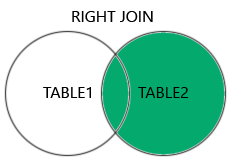
The RIGHT JOIN returns all rows from the right table (table2), and only the matched rows from the left table (table1).
If there is no match in the left table, the result for the columns from the left table will be NULL.
The RIGHT JOIN and RIGHT OUTER JOIN keywords are equal - the OUTER keyword is optional.
RIGHT JOIN Syntax
SELECT column_name(s)
FROM table1
RIGHT JOIN table2
ON table1.column_name = table2.column_name;
Demo Database
Below is a selection from the "Orders" table:
| OrderID | CustomerID | EmployeeID | OrderDate | ShipperID |
|---|---|---|---|---|
| 10308 | 2 | 7 | 1996-09-18 | 3 |
| 10309 | 37 | 3 | 1996-09-19 | 1 |
| 10310 | 77 | 8 | 1996-09-20 | 2 |
And a selection from the "Employees" table:
| EmployeeID | LastName | FirstName | BirthDate | Photo |
|---|---|---|---|---|
| 1 | Davolio | Nancy | 12/8/1968 | EmpID1.pic |
| 2 | Fuller | Andrew | 2/19/1952 | EmpID2.pic |
| 3 | Leverling | Janet | 8/30/1963 | EmpID3.pic |
SQL RIGHT JOIN Example
The following SQL will return all employees, and any orders they might have placed:
Example
SELECT Orders.OrderID, Employees.LastName, Employees.FirstName
FROM Orders
RIGHT JOIN Employees ON Orders.EmployeeID = Employees.EmployeeID
ORDER BY Orders.OrderID;
Try it Yourself »
Note: The RIGHT JOIN keyword returns all records from the
right table (Employees), even if there are no matches in the left table
(Orders).

