JavaScript Temporal.PlainDate
Dates with No Time
A Temporal.PlainDate object represents a calendar date without a time.
A Temporal.PlainDate is typically in ISO 8601 format ("2026-05-01").
What You Will Learn:
- How to use JavaScript Temporal.PlainDate
- How to work with dates without time
- How to add and subtract days
- How to compare dates safely
Note
Plain Dates are used for dates that remain the same regardless of time zone.
Plaind date is ideal for dates such as birthdays or holidays.
Create a PlainDate
You can create a PlainDate from a string.
The Temporal.PlainDate.from() method creates a PlainDate object with no time zone:
The Temporal.PlainDate.from()method above:
- Parses the input using ISO 8601 parsing rules
- Accepts strings: "2026-05-01"
- Accepts objects: { year:2026, month:5, day:1 }
- Accepts temporal: PlainDate
- Returns a calendar date without a time like 2026-05-17.
Note
Parsing means validation pluss automatic conversion.
You can also create a PlainDate using year, month, and day values.
The Temporal.PlainDate() method creates a temporal PlainDate object with no time zone.
The Temporal.PlainDate() method above:
- Uses a constructor call
- Expects numeric arguments (year, month, day).
- Returns a calendar date without a time like 2026-05-17.
Note
Unlike Date, months start at 1.
When to Use Which?
Use new Temporal.PlainDate() when:
- You have trusted numeric values
- You want speed
- You want predictable construction
- You are doing date math
Use Temporal.PlainDate.from() when:
- You are handling user input (strings)
- You are handling external data (JSON)
- You want maximum flexibility
Get the Current Date
Use Temporal.Now.plainDateISO() to get today's date.
Add and Subtract Days
Use the add() method to add time.
This does not change the original date.
Example
let date = Temporal.PlainDate.from("2026-05-17");
let nextWeek = date.add({ days: 7 });
Try it Yourself »
Use the subtract() method to add time.
Example
let date = Temporal.PlainDate.from("2026-05-17");
let previousWeek = date.subtract({ days: 7 });
Try it Yourself »
Add Months or Years
You can add months or years safely.
Example
const date = Temporal.PlainDate.from("2026-05-17");
const nextMonth = date.add({ months: 1 });
Try it Yourself »
Note
Temporal handles month lengths automatically.
Compare Dates
The compare() method returns -1, 0 or 1.
- -1 if date1 is before date2
- 0 if equal
- 1 if after
Example
// Create two Temporal objects
const date1 = Temporal.PlainDate.from("2026-02-17");
const date2 = Temporal.PlainDate.from("2026-03-01");
// Compare the dates
let result = Temporal.PlainDate.compare(date1, date2);
Try it Yourself »
You can also use equals() to check if two dates are the same.
Example
// Create two Temporal objects
const a = Temporal.PlainDate.from("2026-02-17");
const b = Temporal.PlainDate.from("2026-02-17");
// Compare the dates
let result = (a.equals(b));
Try it Yourself »
Why < and > Do Not Work
Temporal objects are objects, not primitive numbers.
When you write (a < b), JavaScript tries to convert both objects to primitives.
For Temporal objects, this does not produce a numeric timestamp like Dates.
Example
// Create two Temporal objects
const a = Temporal.PlainDate.from("2026-02-17");
const b = Temporal.PlainDate.from("2026-03-01");
// Compare the dates
console.log(a < b); // ❌ Error
When to Use PlainDate
Any date without time
Birthdays
Deadlines
Holidays
Booking dates
Replace Date for Date-Only Values
With Date, you always get a time and time zone.
This can create confusion when you only need a calendar date.
Date Example
let d = new Date("2026-02-17");
PlainDate avoids this by storing only year, month, and day.
Summary
Temporal.PlainDate represents a calendar date without time or time zone.
It is immutable, easy to compare, and safer than using Date for date-only values.
Next Chapter
The Temporal.PlainDate Object
The Temporal.PlainDate object has 16 properties of calendar date information.
These include calendar identification, day/month/year details, era information and other calendar metrics:
| Property | Description |
| calendarID | Calendar system identifier ("iso8601") |
| day | The day as an integer (1-31) |
| dayOfWeek | The day of the week as an integer (1 = Monday) |
| dayOfYear | The ordinal day of the year |
| daysInMonth | The total number of days in that month |
| daysInWeek | The total number of days in that week |
| daysInYear | The total number of days in that year |
| era | The era name of the calendar, if applicable |
| eraYear | The year within the era, if applicable |
| inLeapYear | A boolean indicating if the year is a leap year |
| month | The month as an integer (1-12) |
| monthCode | A string code for the month ("M01") |
| monthsInYear | The total number of months in that year |
| weekOfYear | The week number within the year |
| year | The year as an integer |
| yearOfWeek | The year that the week belongs to |
Note
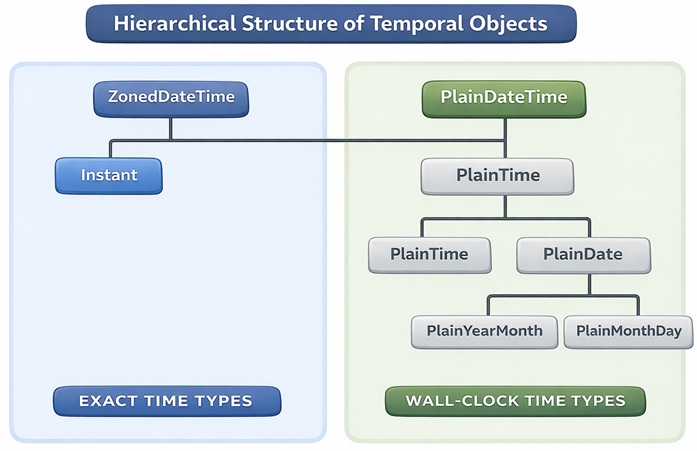
A PlainDate object is essentially the date part of a Temporal.PlainDateTime object, with the time information removed.
Temporal.PlainYearMonth()
The Temporal.PlainYearMonth() method creates a temporal time and year object.
It returns the year and month of an ISO 8601 calendar date, without a day or a time zone.
Return example: 2026-05.
Temporal.PlainMonthDay()
The Temporal.PlainMonthDay() method create a temporal month and day object.
It returns the month and day of an ISO 8601 calendar date, without a year or a time zone.
Return example: 05-01.

